For consultants & advisory practices
The CRM for consultants — from SOW to standing retainer.
Draft the statement of work, get it e-signed on the page, and turn the engagement into a retainer that invoices itself every month.
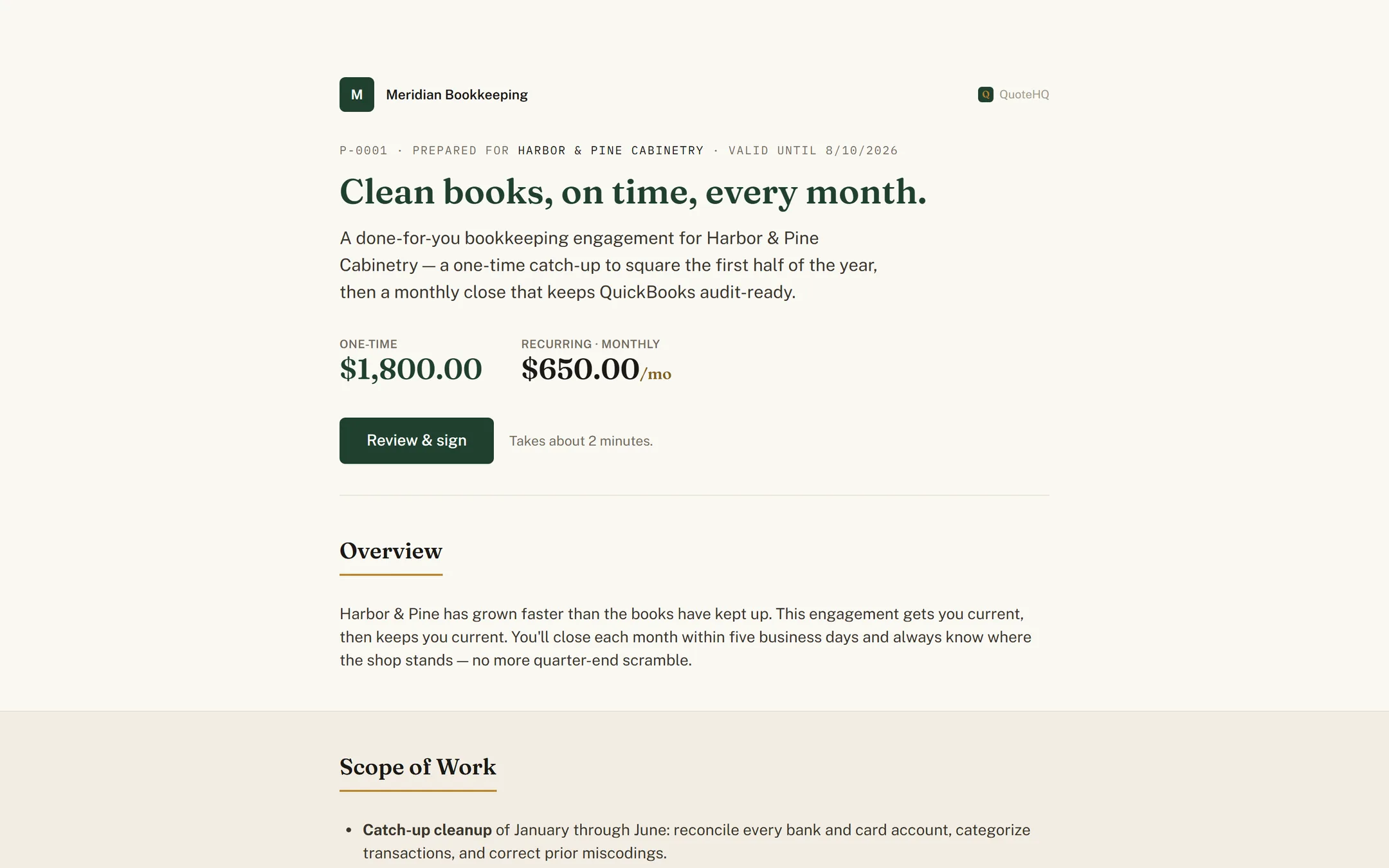
Your week, mapped
One workspace for the whole engagement.
Scope, signature, and billing usually live in three tools that never talk. QuoteHQ carries the engagement through as one continuous move.
Lead
A discovery call becomes a scoped opportunity.
You talk through the problem with a prospective client. Note it as a lead, and the SOW is the very next step — not a blank document three tools away.
Quote
Draft the SOW from a conversation.
Describe the engagement in plain terms and QuoteHQ drafts the statement of work — deliverables, phases, and fees as line items — in your own voice. You edit every word before it goes out.
Signed
Send a link, get back a signed SOW.
Your client opens a clean, branded proposal and signs in the browser. QuoteHQ captures consent and a full audit trail, then seals the SOW to a tamper-evident PDF. When the agreement needs both names, countersign adds yours before it's final.
Scheduled
The engagement lands on the calendar.
A signed SOW turns into a project with its phases and first tasks in place — the kickoff isn't a scramble to rebuild the scope in a second tool.
Invoiced
Turn the engagement into a retainer.
A signed SOW becomes an invoice with no retyping — a deposit up front, then a monthly retainer on a recurring schedule that mints and sends itself.
Paid
Autopay collects on the day, with consent.
Put a card on file with the client's consent and it collects on the day. The chase is gone; the revenue is standing.
Booked
Every retainer posts to QuickBooks, categorized.
The invoice and the payment post themselves the moment money moves, and any card-price difference lands categorized right alongside them — nothing to re-key when you sit down with the books.
The standing engagement
A retainer that bills itself.
Set the cadence once — monthly, quarterly, semiannual, or annual — and QuoteHQ raises each retainer invoice when it's due. With a card on file and the client's consent, autopay clears it on the day, so a standing engagement never waits on a reminder.
How recurring and autopay work →A $4,000 monthly advisory retainer
- Cadence
- Monthly
- Invoice raised & sent
- On the day, every month
- Collected
- Autopay, with consent
The question every consultant asks first
Will an AI-drafted SOW sound like me, or like a template?
It starts as a first draft, built from what you typed about the engagement — not a boilerplate fill-in. You edit every line before it goes out, and nothing sends without your review. The blank page disappears; your judgment on scope, fees, and phrasing doesn’t.
Questions consultants ask.
How much does QuoteHQ cost for a solo consultant or a practice?
Per-seat, billed monthly: Core at $29, Pro at $79, and Agency at $149 per user, per month, each with a 14-day free trial and no card required to start. A solo consultant runs on one seat; add a seat per associate as the practice grows. There's no separate fee to accept payments.
Can it sync my invoices and retainers to QuickBooks?
Yes — push-only to QuickBooks Online for US businesses. Retainer invoices, the payments against them, and any card-price difference all post automatically and land categorized, so your engagement billing and your books never disagree. An import wizard brings existing clients and items over when you connect.
Is an e-signed statement of work legally binding?
It's built to the U.S. ESIGN Act. When your client signs the SOW, QuoteHQ records their consent, name, IP address, browser, and a timestamp, then seals the document to a tamper-evident PDF fingerprinted with a SHA-256 hash and keeps it in a retained archive — the evidence you'd want if scope is ever questioned.
What happens to the card difference on a retainer or deposit?
You stop paying it. Every invoice offers a card price — computed automatically — and a bank-transfer price. A client who pays by card covers the difference inside the card price; a bank transfer (ACH), often the choice for a larger monthly retainer, carries no card difference at all. Either way you net the retainer amount you set.
Do I keep ownership of my client relationships and documents?
Yes. QuoteHQ acts as your processor for the client records you enter — we never sell personal information and never train general-purpose AI models on your data. Every signed SOW is retained and downloadable as a sealed PDF, so your engagement record is yours to keep.
Keep reading
Bigger tickets or standing books? QuoteHQ for contractors and for bookkeepers.
Scope it, sign it, put it on retainer.
Start the trial, draft your first SOW, and turn the next engagement into standing revenue.